
Upgrading, downgrading and cancelling
All three are driven by the buttons on the plan cards in the Plan & billing modal. The button label is chosen from the plan's rank relative to yours (Free, then Pro, then AI Employee).
Upgrade (moving up a tier)
- Open Plan & billing.
- Optionally type a coupon in the "Have a coupon?" box.
- Press Upgrade on the target plan.
- If you have no subscription yet, you go to Stripe Checkout. If you already have one, the change is applied immediately in place, prorated, and you stay in the app (a success toast appears; the numbers refresh once Stripe's webhook lands, which can take a few seconds).
Downgrade (moving down a tier but still paid, e.g. AI Employee → Pro)
- Press Downgrade. The change is scheduled for the end of the current billing period, no refund, no proration, and the current plan's features stay live until then.
- The scheduled change also drops any add-ons the old plan had (extra seats, meters) rather than carrying them over.
- The Plan & billing screen does not show a "scheduled to change on <date>" banner for a downgrade: only for a cancellation. Users may think nothing happened.
Cancel (moving to Free)
- The Free card's button reads "Cancel Subscription" and opens the Stripe billing portal, where the customer confirms. Cancellation is not completed inside myScribe.
- Once cancelled, the banner in Plan & billing turns red and says "Downgrades to Free on <date>".
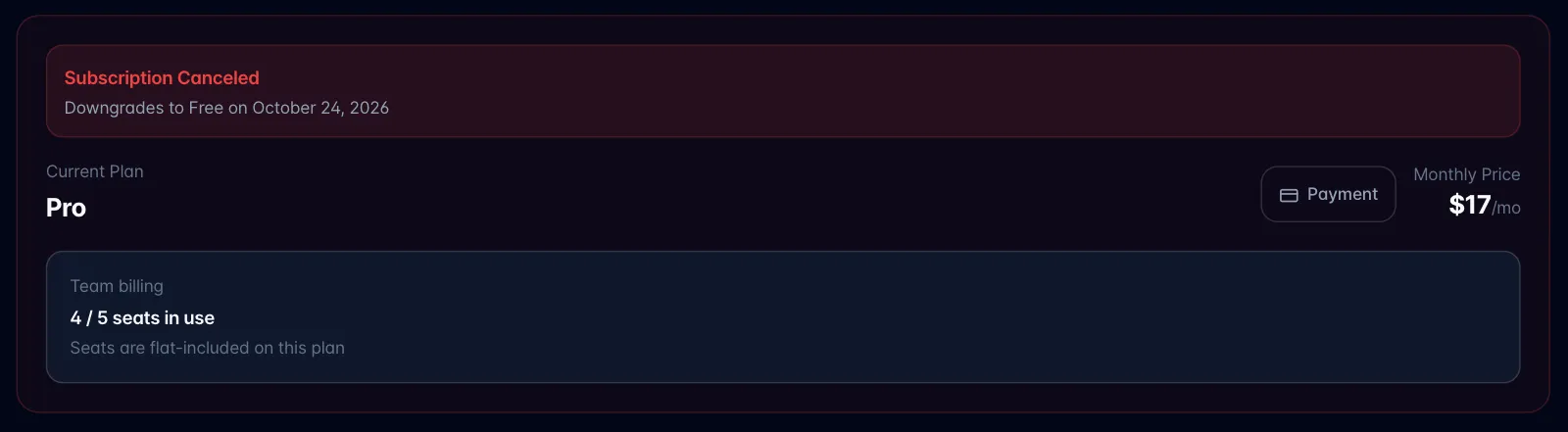
- At period end the org drops to Free: plan reset, seats reset to 1, and the win-back/storage clock starts (Storage: limits, what happens when full, aging and post-cancellation purge).
Who can do any of this: only the billing account owner, or an active member whose role is owner/admin. Everyone else is told that only the owner can manage billing.