
What "pay as you go" actually means
There is no "pay as you go" plan you can buy. pay_as_you_go is the internal name of the Free plan; everywhere the customer sees it, it is called "Free". What is genuinely pay-as-you-go is the overage on four different meters, all of which land on the same card:
| Meter | Included | Rate past the allowance |
|---|---|---|
| Recording minutes | 60 (Free) / 240 (Pro, 1 user) / 720 per seat (AI Employee) | $0.07 per minute |
| AI tokens | 0 (Free) / 300K (Pro) / 10M (AI Employee) | Metered per request at myScribe's token rate |
| AI Employee "Pro chat" turns | 200/month (AI Employee only) | Each further Pro turn charged at cost + markup |
| Storage | 2 / 50 / 200 GB | ≈$0.11 per GB per month |
| Live voice minutes | 10 (Free) / 90 (Pro & Legacy) / 450 (AI Employee) | $0.05 per minute, and only after the workspace owner turns pay-per-minute voice on. Until then voice stops instead of billing. |
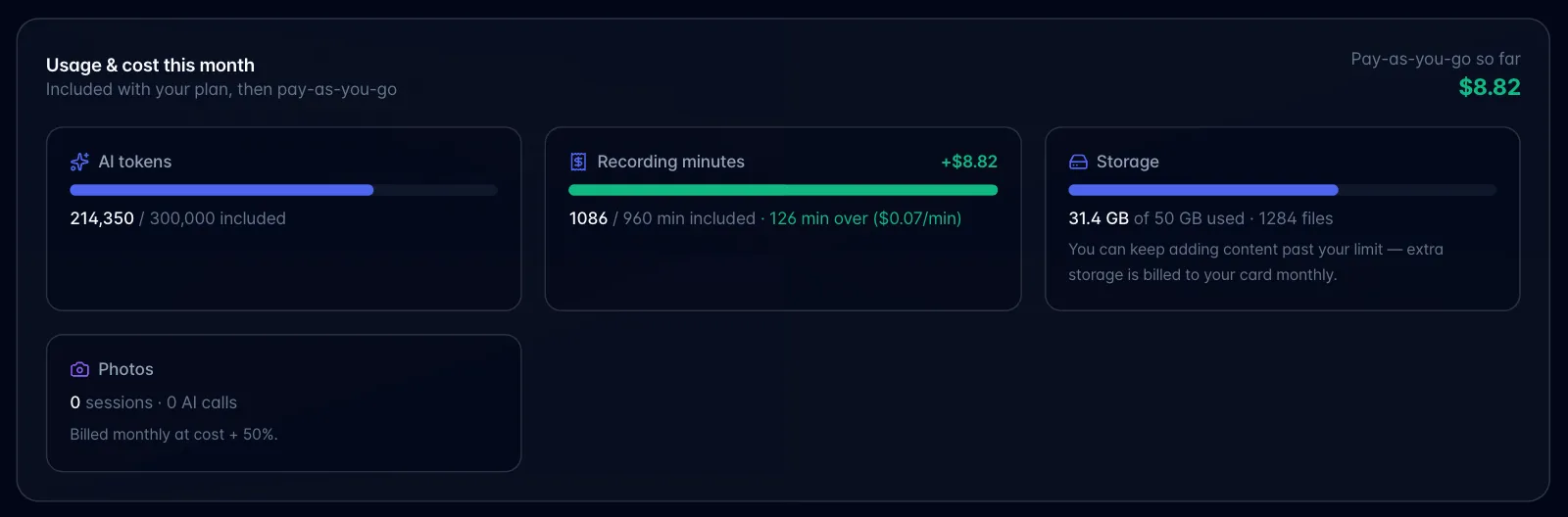
"Add a card: pay as you go" (the second button on the storage-limit prompt) does something narrower than it sounds: it creates a Stripe subscription whose only line is a metered usage price, purely so there is a card and an invoice for overage to land on. It does not change your plan, your included minutes, or your storage allowance. If you already have a full subscription, the same button just opens the Stripe portal to manage the card.
Three things can actually stop you rather than bill you: the Free plan's 60 recording minutes, live voice once your included minutes are spent, and the meeting bot once your workspace passes its monthly ceiling (60 minutes on Free, 40 hours on Pro, no ceiling on Pro w/ AI Employee, where extra bot time bills instead). Everything else (AI usage, storage, recording minutes on a paid plan) goes over and bills.