
Recording minutes and overage
How the pool is calculated. included minutes per seat × seats currently in use, pooled across every active member of the organisation. Buying a seat and leaving it empty adds capacity but no extra minutes. Free is the exception: it is a flat 60 minutes for the whole account, whatever the seat count.
Every completed transcription is billed on how much audio it actually contains, not how long the tab was open. A recording that sat paused for hours bills only the recorded audio. The figure is rounded up to whole minutes and logged once; re-transcribing or regenerating never re-charges it.
The billing month. For an account with a subscription, "this month" runs from your billing day to the same day next month: not the calendar month. Yearly plans work the same way: allowances reset monthly on the day your yearly plan started. Without a subscription it falls back to the calendar month. This is why the usage bars can be out of step with a calendar month.
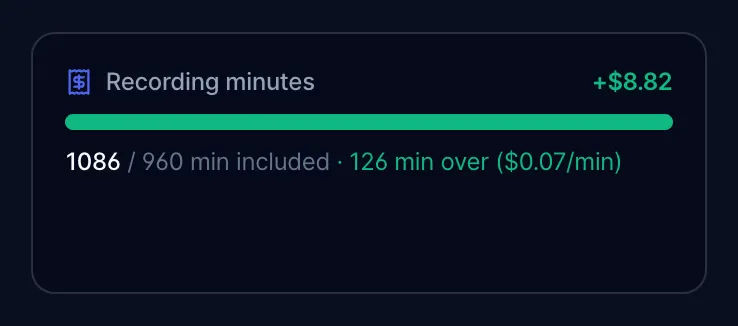
Past the pool. Extra minutes are pushed to Stripe at $0.07/min and appear as usage-based charges on the next invoice. No warning modal, no block: the Plan & billing usage bar simply turns green and shows "N min over ($0.07/min)".
Free plan is different, and this is the single biggest gotcha in the product:
- On Free, live in-app recording is hard-capped at 60 minutes per calendar month. Pressing record past the cap refuses to start and pushes you to the upgrade screen. A recording that crosses the cap mid-session is stopped and saved automatically ("Saved! That's your 60 free minutes for this month").
- Adding a card does not raise the free live-recording limit. Upgrade to a paid plan for metered additional live recording time.
- Uploads and pasted transcripts are not blocked by the minute cap at all. A Free user can import unlimited audio files (subject to the file-size caps: 50 MB audio, 500 MB video) and it will be transcribed.