
Storage: limits, what happens when full, aging and post-cancellation purge
The allowance
2 GB (Free) / 50 GB (Pro and Legacy) / 200 GB (AI Employee), shared across every active member of the organisation: it is not per person. It counts everything in the recordings bucket: audio, meeting-bot video, thumbnails, uploads.
Going over
- Uploads are never blocked server-side. You keep adding content and the extra is billed.
- Overage is billed monthly, once, on the 1st, for the month that just ended, at the rate shown on your Storage tile: currently about $0.11 per GB. The tile always shows your account's own rate, which is the number that will be charged. It lands on the same usage-based invoice line as AI charges.
- Genuinely useful, non-obvious point: the monthly charge is a snapshot of current usage taken when the job runs on the 1st, not an average over the month. Deleting files before the 1st removes the charge for them entirely.
- Plan & billing shows a Storage bar with "X GB of Y GB used · N files", the projected overage in dollars, and the line "You can keep adding content past your limit: extra storage is billed to your card monthly."
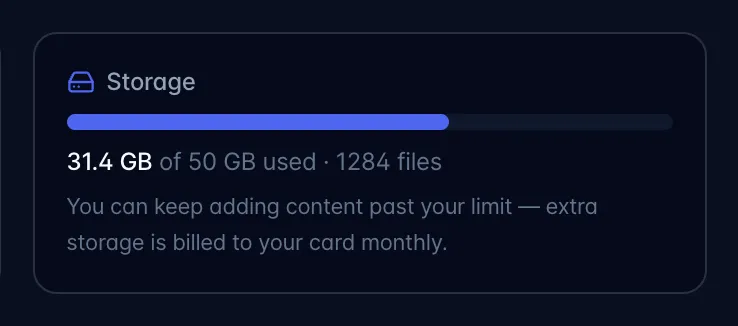
The over-limit prompt (accounts with no billing set up)
If the org is over its storage pool and has no active subscription, then starting a recording, joining a meeting with the bot, or importing a file pops "You're out of included storage", offering Upgrade your plan or Add a card: pay as you go.
- It can be dismissed with "Continue for now" twice, and the modal counts down from the first appearance. That count is kept in the browser you are using, so a different device, a different browser, or clearing site data starts the two over. It also resets for good once you are back under the pool or you have connected billing.
- After that it becomes "New recordings are paused" and new recordings / bot joins / uploads are blocked until they upgrade or add a card. Content already in flight is never touched and nothing is deleted.
- The counter resets automatically once they are back under the pool or billing is connected.
- The prompt keys off having an active subscription, not merely a card on file: an abandoned checkout, or a subscription cancelled by failed payments, will bring it back.
Audio aging (applies to everyone, quietly)
A daily job re-encodes stored audio down to an archival bitrate (16 kbps Opus / 32 kbps AAC) when:
- the recording is more than 12 months old, or
- the owner's paid plan has ended, the account's recording audio and video are over the Free plan's 2 GB, and the day-60 email below has already given notice of removal. An account that comes back within the first 60 days, or that fits within 2 GB, is never re-encoded for having ended its plan.
This is one-way and permanent for the audio file. Transcripts, summaries and tasks are untouched. Recordings made before the current 32 kbps default (roughly 128 kbps browser-default files) are deliberately included, so those shrink the most. Roughly 200 recordings are processed per day, so a large backlog takes a while.
After cancellation: the 90-day clock
When a paid subscription ends, a win-back sequence starts:
- Day 30: email with 50% off Pro or Pro w/ AI Employee for 3 months (code
COMEBACK50). - Day 60: the same offer again. If the account's recording audio and video add up to more than the Free plan's 2 GB, this email also names the removal date and says exactly what will go. If they fit within 2 GB, the email says the whole library stays, and nothing is ever removed for that cancellation.
- Day 90 or later: only for an account that received that notice: the audio and video files of the oldest recordings that do not fit in 2 GB are permanently removed. The newest recordings keep their audio and video, newest first, so a small older file that still fits is kept too.
What is never removed: the recordings themselves, with their titles, transcripts, summaries, notes, highlights, tasks and shares. Photos, PDFs and other files are not touched either. A recording whose media was removed stays in the Library; opening it shows a note with the removal date in place of the player.
Safeguards worth stating plainly in an article:
- Removal only happens after the day-60 notice was sent, and never sooner than 25 days after it, whichever is later than day 90.
- It runs once per cancellation.
- Anyone who is also an active member of another workspace with a live subscription is skipped entirely: their content is not touched.
- Reactivating any plan before the removal date cancels it. Any reactivation clears the lapse stamp immediately.
- Until the removal date you can sign in and download any recording.
- The audio re-encode above runs between the notice and the removal date, so roughly twice as many recordings keep their audio inside the 2 GB.